Guide
SDK Swagger Code Generator
To use and test the services provided by the SDK, you can leverage the Unit Test projects included with the SDK itself.
To run the tests correctly, you first need to initialize the environment by specifying the connection details for your WebAPI environment.
To do this, you need to modify the Init function found in each test class.
For example, consider the test project for cli/for (project Test and class CustomerSupplierCOApiTests.cs).
Modify the Init function by providing your WebAPI environment details:
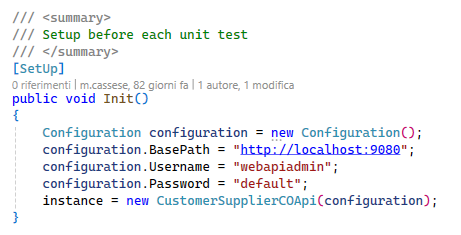
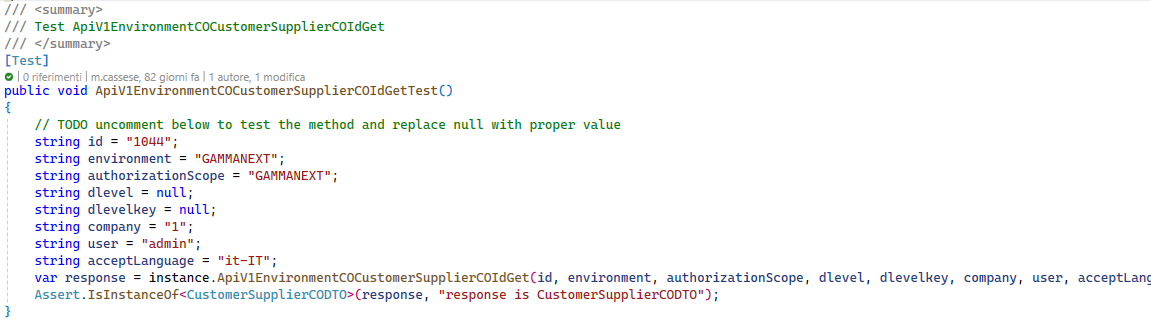
After updating the Init function, you can run one of the tests provided by the SDK. For example, to try the GetByID operation, you can modify the corresponding function in the test project that implements the GET call; as indicated in the code, simply uncomment the relevant lines and update the data to match your WebAPI environment.
Continuing with the cli/for example, to perform a Get for a customer, enable the commented lines in the ApiV1EnvironmentCOCustomerSupplierCOIdGetTest function and update them with your WebAPI environment parameters:
Currently, the SDK does not allow the correct execution of a “GetNew” action (e.g., ApiV1EnvironmentCOCustomerSupplierCOGetTest) since this action always returns a response with an empty DTO, causing the SDK to fail because required fields are null.
Therefore, SDK functions implementing GetNew (without the Id prefix) cannot be used.
To perform a POST for a customer, you can use the ApiV1EnvironmentCOCustomerSupplierCOPostTest function.
Uncomment the relevant lines and, since this is a POST, you need to provide a body, which can be created by filling in the appropriate objects that represent the body elements. These will then be serialized by the SDK into the corresponding JSON code passed to the call.
For example, to insert a new customer associated with General Master Data code 26, you can build the body using the SDK classes that map the customer data model.
The SDK requires that all fields marked as required in Swagger must be specified; otherwise, the call will fail.
For a customer, the required fields are clifor, ditta, and the GeneralMasterDataCO subsection of the general master data (for the latter, only the code field is required):

For the POST to succeed, you must specify a non-existent customer code (in the clifor field of the CustomerSupplierCODTO object); otherwise, it will report that the customer already exists. You cannot omit this field as it is required, and the call would be blocked before the WebAPI assigns a new customer code.
Alternatively, instead of manually building the body by filling in each class that makes up the DTO, you can directly provide the JSON string for the body and have it automatically deserialized into the corresponding DTO classes using the Newtonsoft.Json library, which is included as a reference in the SDK projects.
For example, to insert a new document, you can pass the POST body directly as a string and pass it to the Newtonsoft deserializer:
/// Test ApiV1EnvironmentMGDocumentoPost

[Test]
public void ApiV1EnvironmentMGDocumentoPostTest()
{
    // Pass the body directly as a JSON string for deserialization
    string bodystr = "{  \"datadoc\": \"2025-07-31T00:00:00\",  \"datareg\": \"2025-07-31T00:00:00\",  \"numdoc\": 0,  \"anagraficaDocumentoDitta\": {    \"codDocumMg36\": \"CLI-DDT\",    \"indStaperMg36\": \"0\"  },  \"customerSupplierMG\": {    \"tipocfCg40\": \"0\",    \"cliFor\": \"44\",    \"generalMasterDataCO\": {        \"codice\": 16    }  },  \"sezdoc\": \"0\",  \"storageWH\": {    \"codDep\": \"00\",\t\"dataatt\": \"1900-01-01\"  },  \"righe\": [    {      \"codartMg66\": \"A2\",      \"descart\": \"Test articolo\",      \"qta1\": 1,\t  \"progrRiga\": 1,\t  \"importo\": 100,\t  \"numReg\": \"0\",      \"codiva\": {        \"codice\": 22,\t\t\"descrizione\": \"Iva Impon. 22%\"      },      \"codIvaEff\": {        \"codice\": 22,\t\t\"descrizione\": \"Iva Impon. 22%\"      }    }  ]}";
    DocumentoTestataMGDTO body = Newtonsoft.Json.JsonConvert.DeserializeObject<DocumentoTestataMGDTO>(bodystr);

    string authorizationScope = "TSENTDB";
    string environment = "TSENTDB";
    string acceptLanguage = "it-IT";
    string company = "1";
    string user = "admin";
    var response = instance.ApiV1EnvironmentMGDocumentoPost(body, authorizationScope, environment, acceptLanguage, company, user);

    Assert.IsInstanceOf<DocumentoTestataMGDTO>(response, "The response is not of type DocumentoTestataMGDTO");
}
Remember that the body must always include all fields marked as required in Swagger (red asterisk), even if they refer to related sub-entities; otherwise, the SDK's POST (or PUT) function call will fail, indicating that a required field is null.
To perform a PUT on a customer, you can use the ApiV1EnvironmentCOCustomerSupplierCOIdPutTest function.
Since this is a PUT, you need to provide a body, which, as with the POST, can be created by filling in the relevant objects representing the body elements, which will then be serialized by the SDK into the corresponding JSON code passed to the call. Alternatively, as shown above for the POST, you can pass the body as a string and have it deserialized by the Newtonsoft library.
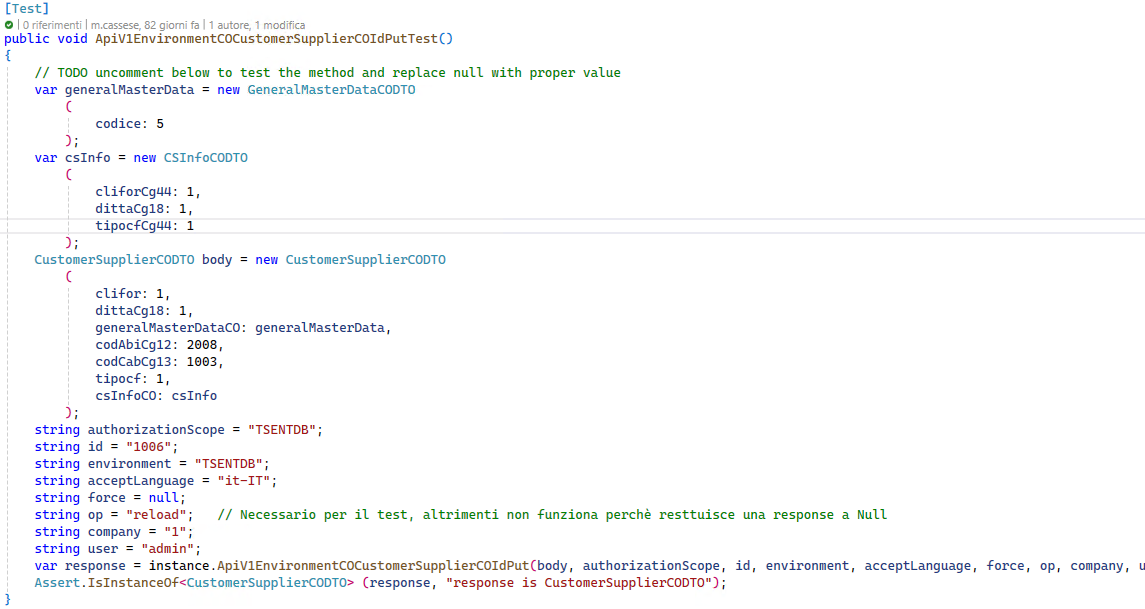
For PUT operations, you must always specify the operator op with the value “reload” in the query parameters so that the response returns the body modified by the PUT.
In the SDK unit tests, it is checked that the response matches the reference DTO object.
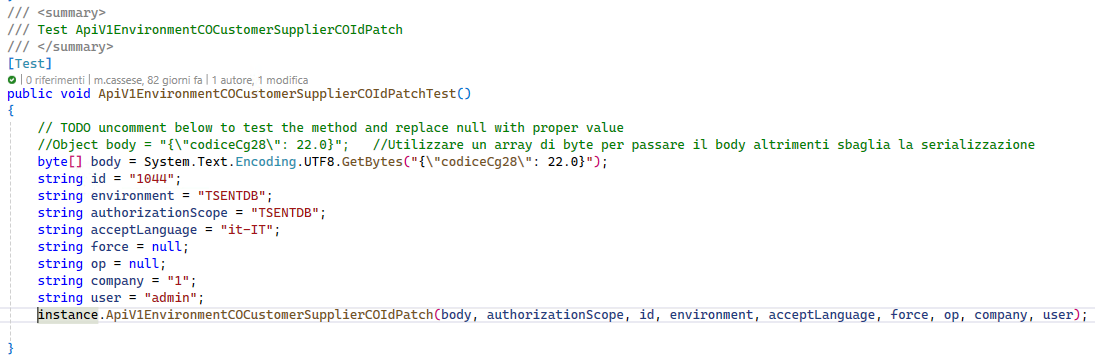
To perform a PATCH on a customer, you can use the ApiV1EnvironmentCOCustomerSupplierCOIdPatchTest function.
Uncomment the relevant lines and, since this is a PATCH, you need to provide a body with the fields to be updated.
In this case, the body must be passed as a byte array; otherwise, the subsequent serialization will fail:
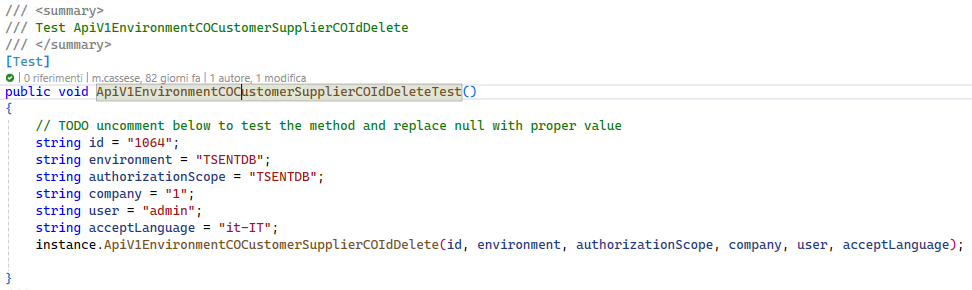
To perform a DELETE on a customer, you can use the ApiV1EnvironmentCOCustomerSupplierCOIdDeleteTest function.
Uncomment the relevant lines and fill in the fields to be passed to the call: