Glossary
If you are a newbie in the TSE in Cloud world, you will most probably feel overwhelmed by the amount of information that you can find in this documentation.
This is why we suggest you get started by learning what we're talking about: we think that you need to get accustomed to the terms used by the TSE in Cloud API as a very first step.
Common Terms List
Below you can find a list of the main concepts that you need to know:
Url
It is the URL that you connect to to access the application; it has a structure like
[protocol]://[cid].domain
For example https://csdemo.teamsystem.io
CID
Customer identification is assigned uniquely to a customer
For example csdemo
APIGateway
An API gateway is a protection point for accessing APIs, which secures and manages traffic between API consumers and the applications exposing those APIs.
Adopting an API gateway offers several advantages, ensuring:
- Authentication and authorization;
- Routing to backends;
- Rate limiting to prevent system overload and protect against DDoS attacks;
- SSL/TLS traffic offloading to improve performance and handle errors or exceptions;
- Tracking and monitoring access to resources.
The TSE APIs intended for integration are exposed downstream of the Teamsystem PaaS API Gateway.
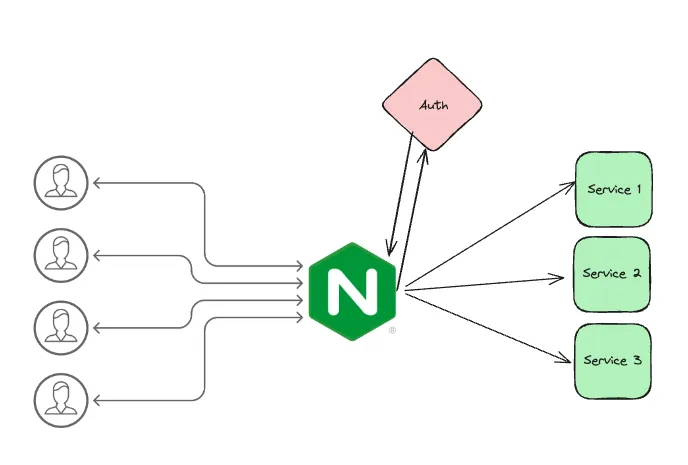
Simplified schema of API Gateway access with Nginx
webapi_base_url
This is the URL you connect to in order to access the application (interface). It has a structure like:
webapi_base_url: [protocol]://[cid].domain
For example: https://csdemo.teamsystem.io
apigwt_base_url
This is the URL you connect to in order to access services (RESTful). It has a structure like:
apigwt_base_url: https://api + [webapi_base_url]/api
For example:
https://apicsdemo.teamsystem.io/api/swagger/docs/index.html, to access the Swagger documentation;https://{{apigwt_base_url}}/api/v1/{{scope}}/CO/CustomerSupplierCo/search?company=2, to access the customer service.
Scope
Also referred to as [environment] represents the set of data to which you have access; although other configurations are possible in Teamsystem Enterprise Cloud, each installation has access to only one environment.
ResourceName
It is the REST resource name assigned to the application entity; it is used in the rest call.
For example:
{{webapi_base_url}}/api/v1/{{scope}}/CO/CustomerSupplierCo/search?company=2