Documentation to Support Usage Scenarios
To support the various managed usage scenarios, some use cases are provided as examples.
Although the use of services allows for implementations different from those specified, it is reminded that the supported functionalities are those described in the indicated Use Cases.
General Master Data
Default 'ditta' field in data transfer objects (DTO)
In POST requests to insert new records or documents, it is possible to specify the 'ditta' or 'dittaCg18' field.
A practical example: You want to insert a document with document type C-DDT for customer 1 and for company 1000.
Until version 202403000, The 'ditta' field had to be defined for each property of the body, so it was necessary to populate the 'ditta' or 'dittaCg18' field as shown in the JSON example below::
{
    "ditta": '1000',
    "valutaCg08": "EURO",
    "anagraficaDocumentoDitta": {
        "dittaCg18": '1000',
        "codDocumMg36": "C-DDT",
        "indStaperMg36": 1.0
    },
    "customerSupplierMG": {
        "dittaCg18": '1000',
        "tipocfCg40": 1,
        "cliFor": 1
    },
    "sezdoc": "00",
    "storageWH": {
        "dittaCg18": '1000',
        "codDep": "00"
    },
    "righe": [
        {
            "ditta": '1000',
            "progrRiga": 1.0,
            "codartMg66": "ART001",
            "descart": "Descrizione articolo",
            "qta1": 15.000
        }
    ]
}
From version 202501000 a default logic for the 'ditta' field in Data Transfer Objects (DTO) has been introduced, so if the value of the 'ditta' field of the "root" entity is not provided or is null, it is automatically populated with the company code retrieved from the current user session (parameter 'company'). This operation propagates to all associated 'external' and 'internal' entities.
Consequently, considering the example above, the user always has the same POST request.:
{{webapi_base_url}}/api/v1/{{scope}}/MG/Documento?company=1000
but in the body properties, it is no longer necessary to define the 'ditta' or 'dittaCg18' field, as shown in the JSON example below:
{
    "valutaCg08": "EURO",
    "anagraficaDocumentoDitta": {
        "codDocumMg36": "C-DDT",
        "indStaperMg36": 1.0
    },
    "customerSupplierMG": {
        "tipocfCg40": 1,
        "cliFor": 1
    },
    "sezdoc": "00",
    "storageWH": {
        "codDep": "00"
    },
    "righe": [
        {
            "progrRiga": 1.0,
            "codartMg66": "ART001",
            "descart": "Descrizione articolo",
            "qta1": 15.000
        }
    ]
}
Note: If the 'ditta' field is defined in a body property, it must be defined in all properties that make up the body.
Minimal Insertion of General Master Data
Insertion of general master data as a Natural Person:
{
    "codfiscale": "MRARSS13S08H501H",
    "partiva": null,
    "flgAnagval": 1.0,
    "ragSoAnag": "Mario Rossi & C",
    "statofiscCg07" : 86.0, // Country ITALY
    "sesso": 0.0, // 0 = M   1 = F
    "addresses": [
       {
            "cap": 47838,
            "citta": "Rimini",
            "numciv": "12",
            "via": "Draghi 9",
            "addressesType": [
                {
                    "tipo": 1 // Business location
                }
            ],
            "statoEst": {
                "codice": 86.0 // Country ITALY
            }
        }
    ]
}
Minimal Insertion of a Customer/Supplier
To insert a customer or supplier, it is necessary to have previously inserted the common master data and, when inserting a customer, indicate the corresponding common master data code, as shown in the example below:
{
    "flgAttivo": 1.0,
    "tipocf": 0.0,
    "generalMasterDataCO": {
        "codice": 774
    },
    "paymentTermCO": {
        "codPag": "301",
        "descPag": "NR.01 RD A VISTA",
        "id": 50
    },
    "extensionData": []
}
Accounting
Journal Entries
The resource GLEntryFI can be used to enter journal entries in TSE.
Although the same resource can be used for entering any type of journal entry, the application scenario currently supported on the cloud is the entry of a Customer Sales Invoice with Due Dates.
Regarding Swagger, refer to the following service: FI / GLEntryFI / multiplecreatejob.
The journal entry scenarios are made available directly in Swagger within the POST (Create) call and in the POST of the multiplecreatejob of the IntegrationFI\GLEntryFI module, with some examples.:
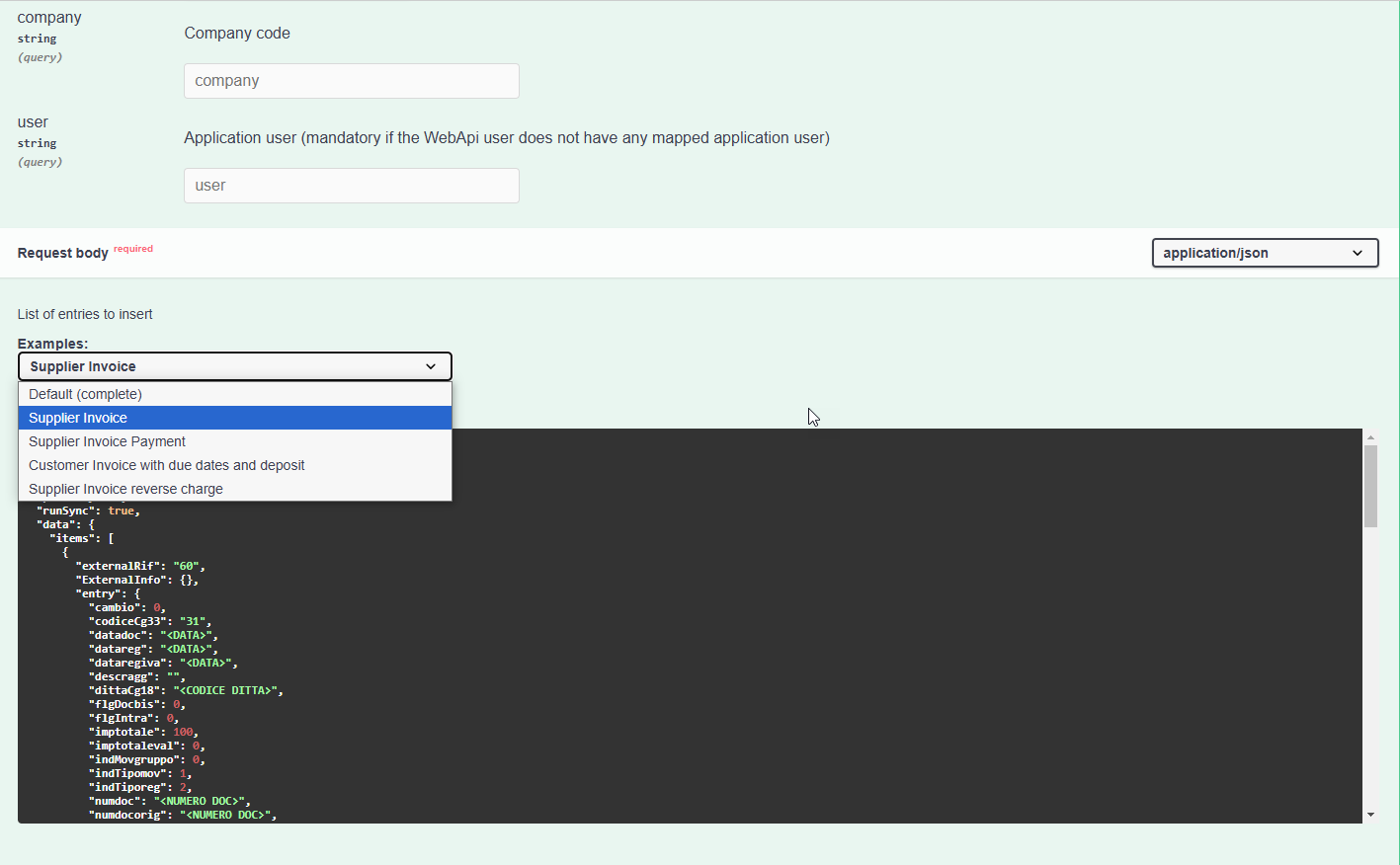
Using the "Try it out" feature, you can automatically execute the call by replacing the placeholders indicated in the examples with the appropriate data.
Available multiplecreatejob examples:
- Default (complete): provides the complete call body;
- Supplier Invoice: supplier purchase invoice;
- Supplier Invoice Payment: supplier purchase invoice payment;
- Customer Invoice with due dates and deposit: customer sales invoice with deposit and due dates;
- Supplier Invoice reverse charge: supplier purchase invoice in reverse charge.
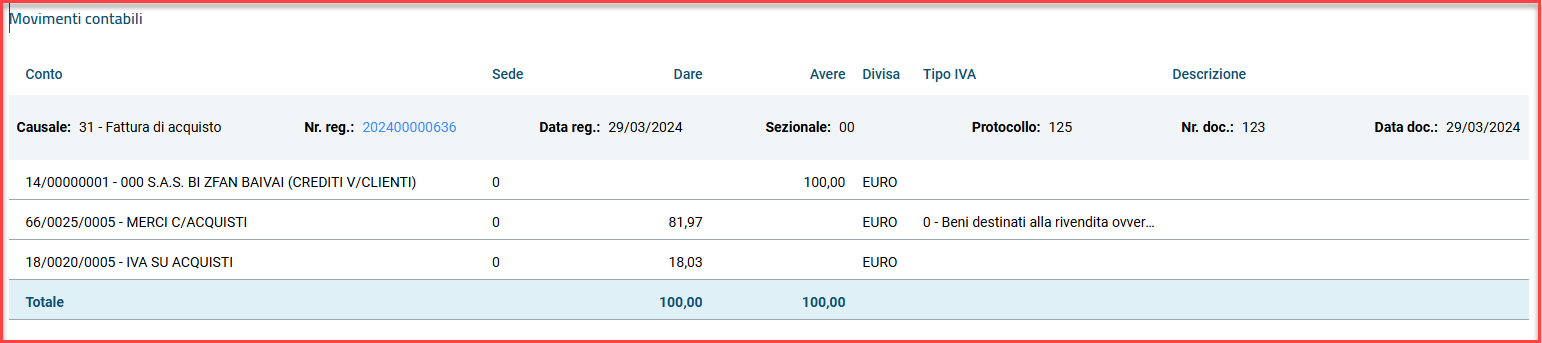
- Supplier Invoice/Payment
- Supplier VAT transaction (reason code 31) without due dates;
1 counterpart with VAT code (22%) on purchase account
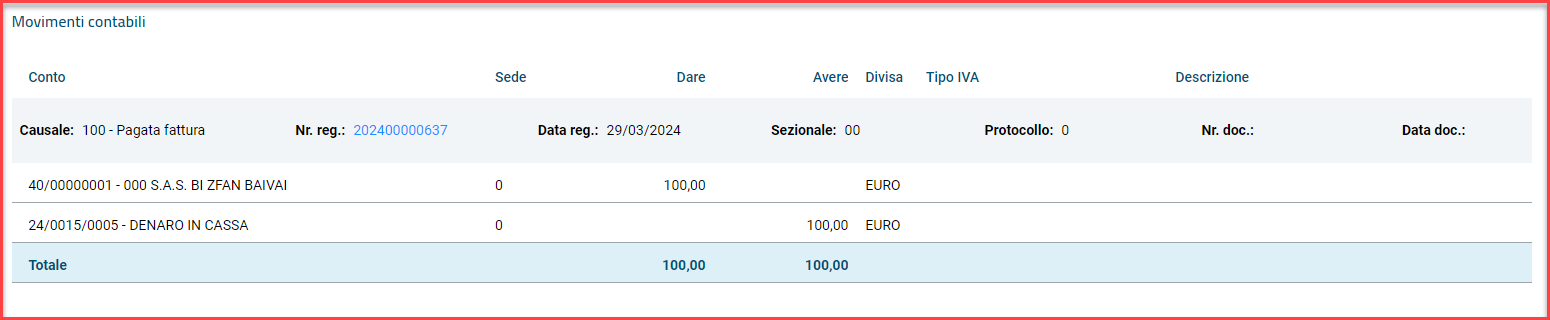
- Supplier invoice payment
- Reason paid invoice (100) with supplier reference document number;
- 1 Supplier line;
- 1 Bank counterpart line
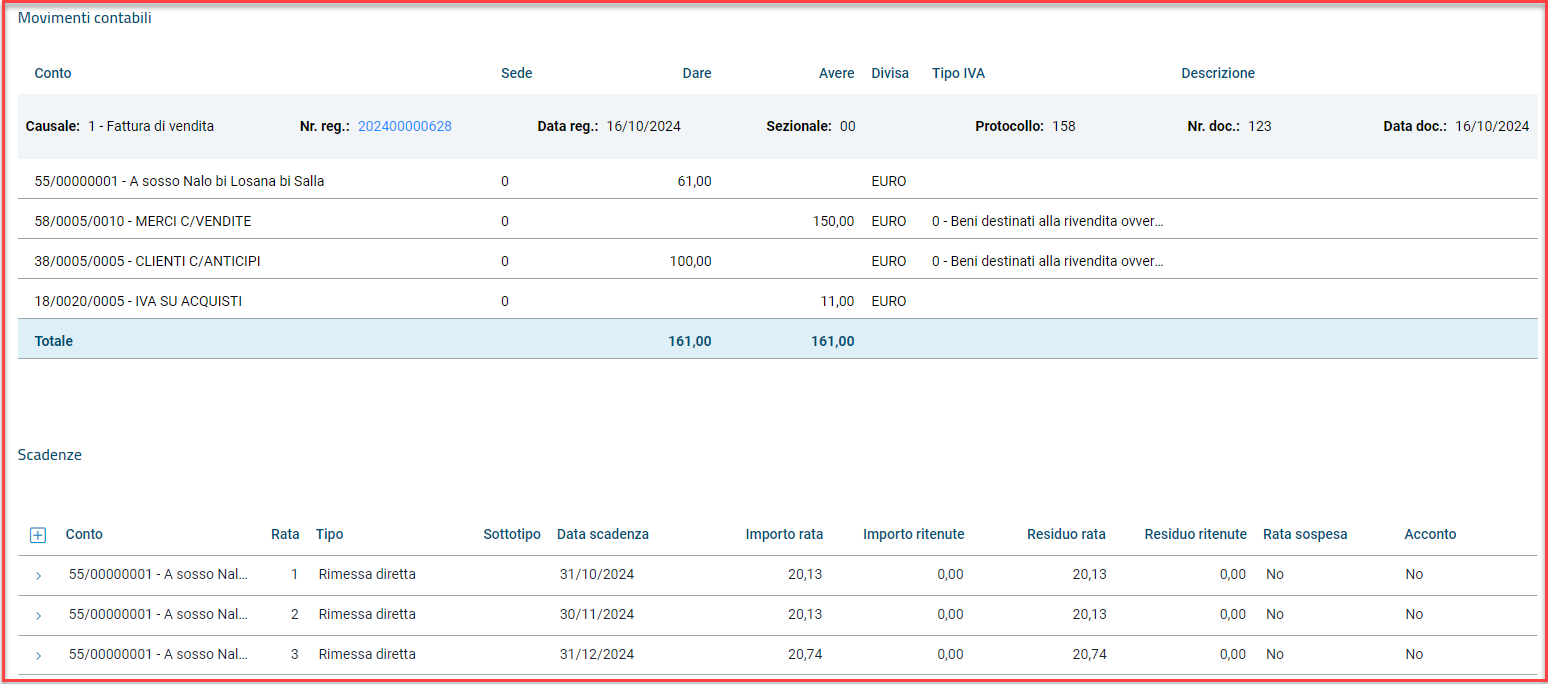
- Customer Invoice with due dates and deposit
- Customer VAT transaction (reason code 1) with 2 accounts and 2 VAT liabilities at 22% with deposit reversal
- 1 counterpart with VAT code (22%) on revenue account
- 1 counterpart with VAT code (22%) on customer advances account
- 3 due dates (30/60/90) The deposit line present in the invoice is entered as a value line with a negative amount.
- Supplier Invoice reverse charge
- Supplier VAT transaction (e.g., reason code 91) with reverse charge VAT code
- 1 counterpart with reverse charge VAT code
- 1 due date of direct remittance type
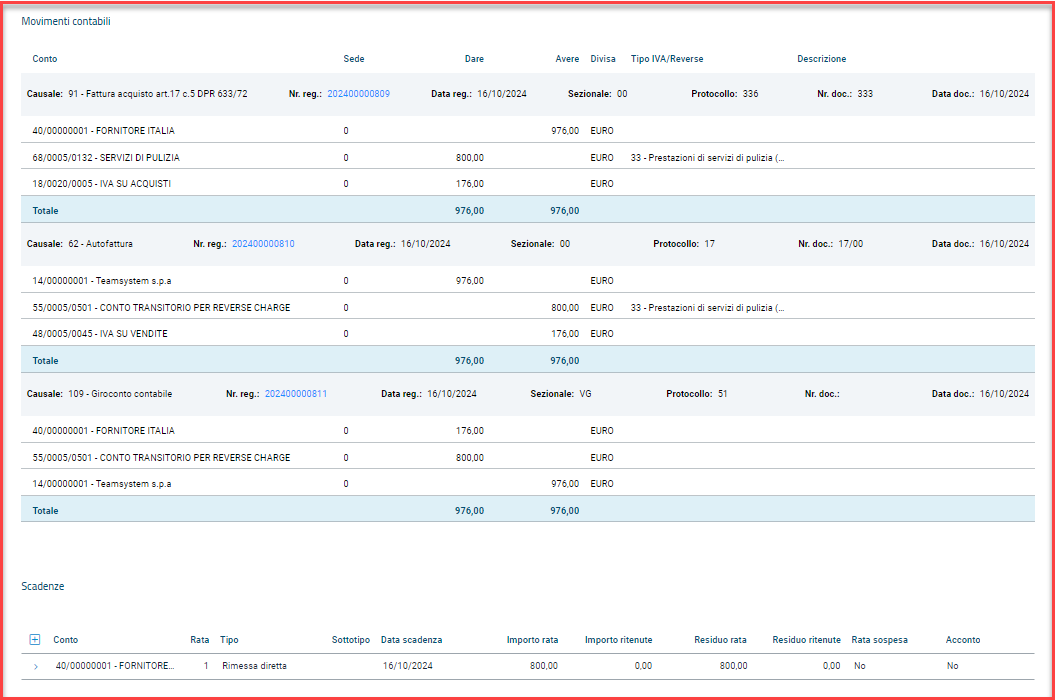
Notes: The attached example uses the reason code 91 Purchase invoice art.17 c.5 DPR 633/72 with an Italian supplier. The same example is valid for all reverse charge reasons:
- 51 Intra-community purchase invoice (Cee supplier)
- 96 Purchase invoice subject to non-residents (art.17 c.3) (Extracee supplier)
- 41 Purchase invoice RSM (San Marino supplier)
- 93 Purchase invoice art.17-ter DPR 633/72 (split payment supplier)
with the following code details in the call:
{

    "data": {
        "items": [
            {
                "vatReverseIncoporated": true,
                "recoverReverseChargeIfNotDefined": true,
                "externalRif": "60",
                "ExternalInfo": {},
                ....
            }
                ]
            }
}
We also provide the following code details related to:
- Supplier VAT transaction with withholding tax
			"WtPurchases": [
				{
					"codTribrp": "",
					"codTributo": "1040",
					"contcditta": 0.0,
					"contcperc": 0.0,
					"contribint": 0.0,
					"datareg": "{{dataReg}}",
					"dittaCg18": {{defaultCompany}},
					"enasazienda": 0.0,
					"flgSegno": 0,
					"imponibilera": 100.00,
					"imponibilerp": 100.00,
					"importoalrit": 0.0,
					"importora": 20.00,
					"ind770": 1,
					"percra": 20.0,
					"percrp": 0.0,
					"provvnonsog": 0.0,
					"rimborsi": 0.00,
					"generalMasterDataCODTO": {
						"codice": {{idAnagProfessionista}}
					},
					"sectionalMasterDataCODTO": {
						"dittaCg18": {{defaultCompany}},
						"sezionale": "00"
					},
					"wtCodeCODTO": {
						"codice": "101 "
					}
				}
			]
Available examples in GLEntryFI:
- Default (complete): provides the complete call body;
- Accounting transfer: accounting transfer.
- Accounting transfer
-
NON-VAT transaction (reason 109)
- 1 Supplier line (supplier debts);
- 1 transitional account line;
- 1 Customer counterpart line

Property tipoDoc - document type To ensure consistency in the VAT transaction registration, it is recommended to pass the property tipoDoc (document type) among the header values, setting it coherently with the relevant VAT reason.
Below are the values to pass based on the relevant reason:
-
PURCHASES VAT reason in (31, 41, 51, 71, 91, 93, 96) -> tipoDoc = 2 VAT reason = 32 -> tipoDoc = 1 VAT reason = 33 -> tipoDoc = 14 VAT reason in (35, 42, 52, 92, 94, 97) -> tipoDoc = 5 VAT reason = 37 -> tipoDoc = 7 VAT reason = 39 -> tipoDoc = 9
-
SALES VAT reason in (1, 61, 281) -> tipoDoc = 1 VAT reason = 2 -> tipoDoc = 13 VAT reason in (5, 63, 285) -> tipoDoc = 4 VAT reason = 7 -> tipoDoc = 6 VAT reason = 9 -> tipoDoc = 8 VAT reason = 62 -> tipoDoc = 10
Creation of VAT lines
For each journal entry, it is possible to specify through the parameter autoVatRow whether to calculate the lines automatically (true) or pass them externally (false). By default, the parameter is set to false.
Creation of due dates
Currently, they are not measured through payment conditions and therefore must always be passed. Note: the amount of the due date installments and the related VAT must match the total document amount.
Framework
Dlevel e Dlevelkey
Through the DlevelEntityName service, it is possible to retrieve a list of information related to correlated entities, starting from a specific DTO, in order to understand the names of the Entities (internalNameDeserialization and externalNameDeserialization) to then populate the required dlevel property in all standard GET requests of the WebApi.
The deserialization level is a syntax that describes which branches of the graph that constitutes the aggregate should be loaded in a read operation. Syntax:
[] square brackets identify internal relationships curly brackets identify an external relationship
- identifies all relationship names in that context For example, given a 'DTO name: DocumentoTestataMGDTO, the following call can be made:
GET {{webapi_base_url}}/api/v1/{{scope}}/FW/DlevelEntityName/DocumentoTestataMGDTO?company={{defaultCompany}}
which will return the following information in the response::
[
    {
        "internalNameDeserialization": "DocumentoDatiAccompagnamentoMG",
        "externalNameDeserialization": null,
        "relatedDTOEntityName": "DocumentoDatiAccompagnamentoMGDTO",
        "relatedDTOPropertyName": "DocumentoDatiAccompagnamentoMG"
    },
    {
        "internalNameDeserialization": "RigheDocumento",
        "externalNameDeserialization": null,
        "relatedDTOEntityName": "DocumentoRigaMGDTO",
        "relatedDTOPropertyName": "Righe"
    },
    {
        "internalNameDeserialization": "DocumentoTestataAgentiMG",
        "externalNameDeserialization": null,
        "relatedDTOEntityName": "DocumentoTestataAgentiMGDTO",
        "relatedDTOPropertyName": "DocumentoTestataAgentiMG"
    },
]
If you want to view information related to the internal entity 'RigheDocumento', you execute the same call indicating the EntityDTOName: DocumentoRigaMGDTO, as shown below::
GET {{webapi_base_url}}/api/v1/{{scope}}/FW/DlevelEntityName/DocumentoRigaMGDTO?company={{defaultCompany}}
which will return in the response all the 'internalNameDeserialization' and 'externalNameDeserialization' for the specified DTO:
[
    {
        "internalNameDeserialization": "DocumentoCorpoCOINMG",
        "externalNameDeserialization": null,
        "relatedDTOEntityName": "DocumentoRigaCOINMGDTO",
        "relatedDTOPropertyName": "DocumentoRigaCOINMG"
    },
    {
        "internalNameDeserialization": null,
        "externalNameDeserialization": "CodIvaCO",
        "relatedDTOEntityName": "VatCodeCODTO",
        "relatedDTOPropertyName": "CodIva"
    },
    {
        "internalNameDeserialization": "DocumentoCorpoProgettiMG",
        "externalNameDeserialization": null,
        "relatedDTOEntityName": "DocumentoRigaProgettiMGDTO",
        "relatedDTOPropertyName": "DocumentoRigaProgettiMG"
    },
    {
        "internalNameDeserialization": "RigaRiferimenti",
        "externalNameDeserialization": null,
        "relatedDTOEntityName": "DocumentoRigaRiferimentoMGDTO",
        "relatedDTOPropertyName": "RigaRiferimenti"
    },
    {
        "internalNameDeserialization": null,
        "externalNameDeserialization": "OfficeCO",
        "relatedDTOEntityName": "OfficeCODTO",
        "relatedDTOPropertyName": "OfficeCO"
    }
]
At this point, you can execute the GET call for a specific document and retrieve only the desired information, limiting the GET call to:
the external entity VAT codes from the result DocumentoRigaMGDTO ("externalNameDeserialization": "CodIvaCO")
the internal entity projects from the result DocumentoRigaMGDTO ("internalNameDeserialization": "DocumentoCorpoProgettiMG")
the external entity CustomerSupplier from the result DocumentoTestataMGDTO ("externalNameDeserialization": "CustomerSupplierMG")
the external entity CompanyDocumentMasterData from the result DocumentoTestataMGDTO ("externalNameDeserialization": "CompanyDocumentMasterDataMG")
In this case, the correct syntax translates to "[RigheDocumento[CodIvaCO][DocumentoCorpoProgettiMG]][CustomerSupplierMG],CompanyDocumentMasterDataMG}" and must be URL-encoded to add it as the value of the dlevel parameter.
Then, you execute the GET call for the document, whose numreg corresponds to 202500000024, and also set the parameter dlevel=%5BRigheDocumento%7BCodIvaCO%2COfficeCO%7D%5BDocumentoCorpoProgettiMG%5D%5D%7BCustomerSupplierMG%2C%20CompanyDocumentMasterDataMG%7D in the call: In this way, the response will only include the values of the entities described in the example.
The DlevelKey service is also available, which allows you to obtain a list of all predefined serializations to use in the dlevelkey property, present in all standard GET calls of the DTOname indicated as a parameter in the call.
For example, given the 'DTO name' CustomerSupplierCODTO, through the DlevelKey service, if you execute the following call::
GET {{webapi_base_url}}/api/v1/{{scope}}/FW/DlevelEntityName/CustomerSupplierCODTO?company={{defaultCompany}}
and the response will include some information, including the 'dlevelkey' parameter.:
[
    {
        "entityDTOName": "CustomerSupplierCODTO",
        "dLevelKeyName": "DL_CustomerSupplierCO_GeneralMasterDataCO",
        "deserializationLevel": "{GeneralMasterDataCO}"
    },
    {
        "entityDTOName": "CustomerSupplierCODTO",
        "dLevelKeyName": "DL_GLEntryFI_AnaGen",
        "deserializationLevel": "{GeneralMasterDataCO}"
    },
    {
        "entityDTOName": "CustomerSupplierCODTO",
        "dLevelKeyName": "DL_IntrastatDataHeaderIN_AnaGen",
        "deserializationLevel": "{GeneralMasterDataCO}"
    }
]
At this point, for example, you execute a GET call for CustomerSupplierCO, with idclifor=5, and also set the dlevelkey parameter to DL_CustomerSupplierCO_GeneralMasterDataCO:
GET {{webapi_base_url}}/api/v1/{{scope}}/CO/CustomerSupplierCO/5?company={{defaultCompany}}
In this case, the response will display the properties of the root 'CustomerSupplier' and the entity {GeneralMasterDataCO} as shown in the JSON below:
{
    "gmdUpdateAdditionalParams": null,
    "clifor": 2.0,
    "codAbiCg12": null,
    "codCabCg13": null,
    "codiceCg28": null,
    "contoCg24": null,
    "contorCg24": null,
    "contratto": null,
    "datavaliva": null,
    "dittaCg18": 1000.0,
    "flgArt62": 0,
    "flgAttivo": 1.0,
    "flgCointestati": 0.0,
    "flgIntercompany": 0.0,
    "ggscadfix": null,
    "gruppoCg10": 80.0,
    "guid": "a4630426-554a-4c95-be8b-4bb9bf52a0d2",
    "idclifor": 5,
    "idmediaCg99": null,
    "indElenchimov3000": 99,
    "intermedioCg40": null,
    "lastchange": "2024-12-04T11:40:36.383",
    "progREf08": null,
    "tipocf": 1.0,
    "idExtendedAttributeEntity": 3,
    "idExtendedAttributeSubEntity": 4,
    "generalMasterDataCO": {
        "alias": null,
        "auidAu04": null,
        "cap": "20121     ",
        "capcor": null,
        "capfisc": "20121     ",
        "cellnum": null,
        "citta": "MILANO",
        "cittacor": null,
        "cittafisc": "MILANO",
        "codfiscale": "00000452151",
        "codice": 4,
        "codiceCg07": 86.0,
        "codiceCg15": null,
        "codiceCgc0": null,
        "codicecorCg07": null,
        "codiceident": null,
        "codicesfed": null,
        "codrichiamo": null,
        "cognome": null,
        "comfisCg01": "F205",
        "comnascita": null,
        "comnascitaCg01": null,
        "datanascita": null,
        "datavalid": null,
        "dtfinepec": null,
        "dtiniziopec": null,
        "faxnum": null,
        "flgAnagval": 1.0,
        "flgFattpa": 0,
        "flgNoblacklist": 0.0,
        "flgOmonimo": 0.0,
        "flgPrsfis": 0.0,
        "idmediaCg99": null,
        "indemail": null,
        "indFiscale": "Contrada Fattoria di Greg 1",
        "indFiscaleEX": null,
        "indirCor": null,
        "indirCorEX": null,
        "indirizzo": "Contrada Fattoria di Greg 1",
        "indirizzoEX": null,
        "indsoggrit": 0.0,
        "indweb": null,
        "lastchange": "2024-12-04T11:40:36.357",
        "nome": null,
        "partitaIVA": "00000452151",
        "partiva": "00000452151",
        "partivaEst": null,
        "prov": "MI",
        "provcor": null,
        "provfisc": "MI",
        "provnascita": null,
        "ragSoAnag": "Greg",
        "ragsoanagex": null,
        "ragsocor": null,
        "ragsocorex": null,
        "ragsofisc": "Greg",
        "ragsofiscex": null,
        "rapazestCg16": null,
        "sesso": 0.0,
        "statofed": null,
        "statofedfisc": null,
        "statofiscCg07": 86.0,
        "statonascitaCg07": null,
        "tel1num": null,
        "tel2num": null,
        "idExtendedAttributeEntity": 1,
        "idExtendedAttributeSubEntity": 2,
        "extensionData": [],
        "additionalData": {}
    },
    "extensionData": [],
    "additionalData": {}
}
Metadata DTO
It is the service that, given a reference EntityDTO, produces a list containing the mapping of the DTO. To analyze the structure of the DTO, the following tools are provided:
- GET Service - FW/MetadataDTO/EntityDTOname
A new GET service has been introduced in the IntegrationInfrastructure module for the MetadataDTO resource. This service requires an EntityDtoName parameter and allows you to view the structure of the object, including all its properties and internal and external relationships.
In the response, all relationships of the DTO entity are displayed as follows:
-
Internal relationships of the root or parent entity (which belong to the starting entity and are stored by the CRUD in the same transaction)
-
External relationships of the entity (used for simple decoding of data present in other entities)
For example, if you want to view the structure of DocumentoTestataMGDTO, you need to execute the following call:
GET {{webapi_base_url}}/api/v1/{{scope}}/FW/MetadataDTO/CustomerSupplierCODTO?withdescriptions=true
The service returns the structure of the EntityDTOName in JSON format. Below is just a part of the JSON response:
{
    "name": "Documento",
    "type": "DocumentoTestataMGDTO",
    "entityName": "DocumentoTestataMG",
    "properties": [
        {
            "propertyName": "bancaCg12",
            "propertyType": "Decimal",
            "isKey": false,
            "mandatory": false,
            "entityPropertyName": "BancaCg12",
            "entityPropertyType": "System.Decimal",
            "rangeValue": null,
            "description": null,
            "shortDescription": null,
            "maxLength": 5,
            "scale": 0
        },
        {
            "propertyName": "cambio",
            "propertyType": "Decimal",
            "isKey": false,
            "mandatory": false,
            "entityPropertyName": "Cambio",
            "entityPropertyType": "System.Decimal",
            "rangeValue": null,
            "description": null,
            "shortDescription": null,
            "maxLength": 12,
            "scale": 6
        },
        {
            "propertyName": "cauprestCg15",
            "propertyType": "String",
            "isKey": false,
            "mandatory": false,
            "entityPropertyName": "CauprestCg15",
            "entityPropertyType": "System.String",
            "rangeValue": null,
            "description": null,
            "shortDescription": null,
            "maxLength": 4,
            "scale": null
        },
        {
            "propertyName": "causmagMg51",
            "propertyType": "Decimal",
            "isKey": false,
            "mandatory": false,
            "entityPropertyName": "CausmagMg51",
            "entityPropertyType": "System.Decimal",
            "rangeValue": null,
            "description": null,
            "shortDescription": null,
            "maxLength": 4,
            "scale": 0
        },
    ]
}
In the response, all properties that make up 'DocumentoTestataMGDTO' are listed, as well as all the relationships linked to 'DocumentoTestataMGDTO'. As an example, the following relationName is provided: "righe" :
            "relationName": "righe",
            "relationType": "DocumentoRigaMGDTO[]",
            "entityRelationName": "RigheDocumento",
            "entityRelationType": "DocumentoCorpoMG",
            "multiplicity": "1:*",
            "isExternal": false,
            "meta": {
                "name": "",
                "type": "DocumentoRigaMGDTO",
                "entityName": "DocumentoCorpoMG",
                "properties": [
                    {
                        "propertyName": "alivacompCg28",
                        "propertyType": "String",
                        "isKey": false,
                        "mandatory": false,
                        "entityPropertyName": "AlivacompCg28",
                        "entityPropertyType": "System.String",
                        "rangeValue": null,
                        "description": null,
                        "shortDescription": null,
                        "maxLength": 4,
                        "scale": null
                    },
    ]
}
In this case, you can execute a new GET call on DocumentoRigaMGDTO to view all the properties and relationships for DocumentoRigaMGDTO, and so on.
Additionally, it is also possible to use some additional parameters: the parameter withdescriptions=true which is used to display descriptions in the properties, and the header Accept=application/xml to get the result in XML format.
- Lookup Service - FW/lookup/MetadataDTOView
A new service has been introduced that allows you to see, via lookup, ONLY if the properties are exposed on the DTO (only rows with PropertyDTOName NOT NULL are displayed).
You need to execute the following call:
POST {{webapi_base_url}}/api/v1/{{scope}}/FW/lookup/MetadataDTOView?metadata=true&company={{defaultCompany}}&_op=search
With this lookup, it is possible to perform selections, for example by using the table name or the column name, to retrieve the name of the linked entity.
Starting from 'EntityName' considered in the previous example 'DocumentoTestataMG', you can execute the POST call with the following body:
{
  "filters": {
    "items": [
      {
        "operator": 0,
        "comparer": 0,
        "propertyName": "EntityName",
        "value": "DocumentoTestataMG"
      }
    ],
    "orderingProperties": {
			"EntityName": 0
		}

  },
  "pageSize": 0,
  "pageNumber": 0
}
and in the response, the exposed properties for the examined DTO will be listed.
Alternatively, you can perform a selection starting from the table name. For example, by specifying TableName=CG44_CLIFOR, as shown below:
{
  "filters": {
    "items": [
      {
        "operator": 0,
        "comparer": 0,
        "propertyName": "TableName",
        "value": "CG44_CLIFOR"
      }
    ],
    "orderingProperties": {
			"EntityName": 0
		}

  },
  "pageSize": 0,
  "pageNumber": 0
}
In the response, all exposed properties will be listed. Below is just a part of the JSON response as an example:
{
    "name": "MetadataDTOView",
    "resources": [],
    "pageNumber": 0,
    "pageSize": 77,
    "data": [
        [
            "CustomerSupplierCO",
            "CustomerSupplierCODTO",
            "Property",
            null,
            null,
            "Tipocf",
            "Tipocf",
            "Tipo Cliente / Fornitore",
            null,
            "CG44_CLIFOR",
            "CG44_TIPOCF",
            "decimal",
            1,
            true,
            null,
            "0= Cliente - 1= Fornitore",
            false
        ],
    ],
}
Alternatively, it is also possible to perform a further selection using the column name, by specifying FieldName=CG44_TIPOCF:
{
  "filters": {
    "items": [
      {
        "operator": 0,
        "comparer": 0,
        "propertyName": "FieldName",
        "value": "CG44_TIPOCF"
      }
    ],
    "orderingProperties": {
			"EntityName": 0
		}

  },
  "pageSize": 0,
  "pageNumber": 0
}
In the response, all exposed properties where the aforementioned FieldName is used will be listed:
{
    "name": "MetadataDTOView",
    "resources": [],
    "pageNumber": 0,
    "pageSize": 4,
    "data": [
        [
            "CustomerSupplierCO",
            "CustomerSupplierCODTO",
            "Property",
            null,
            null,
            "Tipocf",
            "Tipocf",
            "Tipo Cliente / Fornitore",
            null,
            "CG44_CLIFOR",
            "CG44_TIPOCF",
            "decimal",
            1,
            true,
            null,
            "0= Cliente - 1= Fornitore",
            false
        ],
        [
            "CustomerSupplierFI",
            "CustomerSupplierFIDTO",
            "Property",
            null,
            null,
            "Tipocf",
            "Tipocf",
            "Tipo Cliente / Fornitore",
            null,
            "CG44_CLIFOR",
            "CG44_TIPOCF",
            "decimal",
            1,
            true,
            null,
            "",
            false
        ],
    ]
}
- Query Descriptor on FW/Lookup service
In the list of available lookups, which can be called using the FWK Get service "FW/Lookup", the mandatory parameters have been defined in the SearchDTO.
For example: the FW/Lookup service returns the Lookup of the ProjectWH entity
 {
        "lookupName": "ItemProjectWH",
        "description": "ItemProjectWH",
        "href": "/api/v1/LDB_TESTWAPILEG/WH/Lookup/ItemProjectWH",
        "typeQuery": "QueryDescriptor",
        "parametersQueryDescriptor": "ProjectCode"
    }
For this entity the parameters must be reported as follows:
{
"parameters": {
"ProjectCode": "1"
}
}
License Service
Starting from version 2025002000, the new LicenseFW service has been introduced, replacing the previous and now deprecated FW/Licenze. Currently, the only available action is a GET request to retrieve all information related to a license ID provided as a parameter.:
GET {{webapi_base_url}}/{{api}}/v1/{{scope}}/FW/LicenseFW/info/{{idLicenza}}?company={{defaultCompany}}
An example of a response JSON is as follows:
{
    "codLicenza": 1055,
    "numLicenza": "XXYYZZW0",
    "keyAttivazione": "9gTE8Rwo",
    "dataRilascio": "2025-04-14T00:00:00",
    "partitaIvaCliente": "11281128112",
    "partitaIvaRivenditore": "01030103010",
    "licenzaDemo": 0,
    "numeroPostazioni": 2,
    "quantita": 0,
    "isValid": true,
    "extensionData": [],
    "additionalData": {},
    "pluginData": {}
}
Infrastructure
Authentication Services
To access all available services, the user must obtain an authentication token, which can be refreshed and revoked. Below are examples of actions to manage this service.
To obtain a new access token, simply make the following call:
POST {{webapi_base_url}}/{{api}}/v1/auth/token
As a response, if everything goes well, you will receive a body like this:
{
    "access_token": "xxx ... yyy123zzz",
    "expires_int": 28800,
    "scope": "test_scope",
    "token_type": "Bearer",
    "refresh_token": "a1b2c3... z9w8y7"
}
Note that in addition to the access token, you must also save the refresh token, identified by the self-explanatory parameter refresh_token, which will be necessary for renewal operations. In fact, when an access token expires, you can renew it with the following call:
POST {{webapi_base_url}}/{{api}}/v1/auth/token/refresh
You need to include in the request a body with both mandatory tokens, access and refresh, with the same values obtained at the time of the request, and the refresh token must NOT be EXPIRED:
{
    "access_token": "xxx ... yyy123zzz",
    "refresh_token": "a1b2c3... z9w8y7"
}
As a response, you will get a body with the same structure as the one for token generation, but with obviously different values, which should be saved for future refresh operations.
To revoke an unexpired access token, you can make the following call:
POST {{webapi_base_url}}/{{api}}/v1/auth/token/revoke
Including in the request body the single parameter "token," which refers to the token assigned to the user that you want to revoke.
Unsupported managements
Below is a list of particular managements currently not supported when inserting a document via WebAPI:
- Risk control
- Explosion of multiple item cards