Authentication
To make requests towards the TSE in Cloud API it is necessary to use only supported authentication methods.
In the next paragraph, you'll find a flowchart that will guide you in your choice.
The currently supported methods are with access token
How i can get authentication ?
This section documents the supported authentication models. M2M Scenario Many times a secure and authorized communication channel is needed between different parts of a system such as two back-end services of different applications. The key aspect of these communications lies in the fact that the element for establishing trust in the system is the client. In TSE a client is assigned a technical API Key which is used during the login phase to recognize it and enable it to use the services.
The figure illustrates the authentication flow (Login).
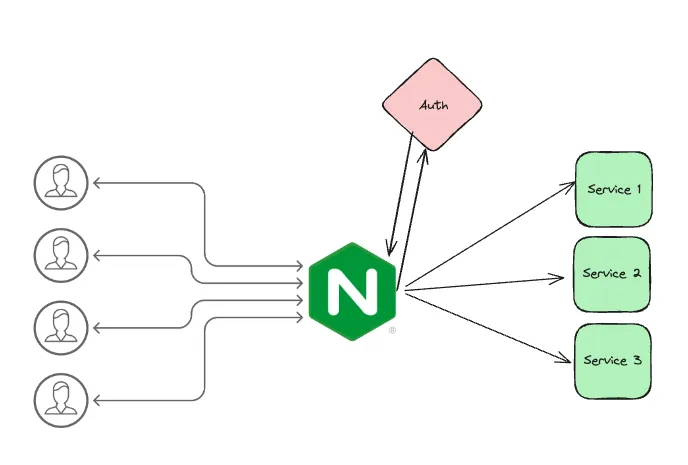
Authentication is handled via services exposed on the API gateway
Token generation
During this phase, the client uses the API Key to obtain a JWT token that will be used in subsequent calls to access application resources. For information on how to obtain an API Key, refer to this link. The application must request the token via POST with parameters in x-www-form-urlencoded to a specific path
- webapi_base_url/auth/token
Specifying in the body
| Form Parameter | Description |
|---|---|
| grant_type required | “token” Type: string |
| username required | admin_<cid> Type: string |
| token required | Bearer API Key Type: string |
| scope required | Indicates the access context for which authorization is requested. Possible values are: webapi_admin - used for example to retrieve the list of environments <environment> - one of any registered work environments Type: string |
In response to the call, an authorization code consisting of a JWT token is obtained, whose duration is reported in the response of the call in the "expires_in" parameter (usually lasting 8 hours).
It is important that in the token section the API Key is preceded by the word Bearer for example
Bearer eyJhbGciOiJIUzI1NiIsInR5cCI6IkpXVCJ9.eyJzdWIiOiJ3ZWJhcGlhZG1pbiIsIndlYmFwaTphdXRoZW50aWNhdGlvbjpzY29wZSI6Imh1Yl9hZG1pbix0c2UxMHdlYmFwaXRlc3QyX2FseXRzZTEwd2ViYXBpdGVzdDIiLCJqdGkiOiIwMjdkYmRlMC03OTg5LTQ0MTItODliOC0yM2FkYTVjNTdjZTIiLCJpYXQiOjE2NTg3NDA4NzcsImlzcyI6IkFseUNFU3J2MlNydklzc3VlciIsImF1ZCI6IkFseUNFU3J2MlNydkF1ZGllbmNlIn0.p1oEy4LJyFuTKIjJynYw4zQQQXIYPO3WfLe8VTNh7XA
WebApi call in action
The calls to the application services will be authenticated with a Bearer token consisting of a JWT token obtained with the Login call. Below are some examples of the get call for clients.
- React
- C#
- cURL
    var https = require('follow-redirects').https;
    var fs = require('fs');

    var options = {
      'method': 'GET',
      'hostname': 'webapicorso1.ts-paas.com',
      'path': '/api/v1/webapicorso1_alywebapicorso1/CO/CustomerSupplierCO/4?company=2',
      'headers': {
        'Authorization-Scope': 'webapicorso1_alywebapicorso1',
        'Content-Type': 'application/json',
        'Authorization': '••••••'
      },
      'maxRedirects': 20
    };

    var req = https.request(options, function (res) {
      var chunks = [];

      res.on("data", function (chunk) {
        chunks.push(chunk);
      });

      res.on("end", function (chunk) {
        var body = Buffer.concat(chunks);
        console.log(body.toString());
      });

      res.on("error", function (error) {
        console.error(error);
      });
    });

    req.end();
    using System.Net.Http.Headers;
    // No more boilerplate needed with top level statements (https://docs.microsoft.com/en-us/dotnet/core/tutorials/top-level-templates)
    var client = new HttpClient();
    var request = new HttpRequestMessage(HttpMethod.Get, "https://webapicorso1.ts-paas.com/api/v1/webapicorso1_alywebapicorso1/CO/CustomerSupplierCO/4?company=2");
    request.Headers.Add("Authorization-Scope", "webapicorso1_alywebapicorso1");
    request.Headers.Add("Authorization", "••••••");
    var content = new StringContent(string.Empty);
    content.Headers.ContentType = new MediaTypeHeaderValue("application/json");
    request.Content = content;
    var response = await client.SendAsync(request);
    response.EnsureSuccessStatusCode();
    Console.WriteLine(await response.Content.ReadAsStringAsync());
    curl --location --request GET 'https://webapicorso1.ts-paas.com/api/v1/webapicorso1_alywebapicorso1/CO/CustomerSupplierCO/4?company=2' \
    --header 'Authorization-Scope: webapicorso1_alywebapicorso1' \
    --header 'Content-Type: application/json' \
    --header 'Authorization: ••••••'