Come fare per
Ottenere il token personale
Come abilitare il sistema all'uso delle API
Un prerequisito per il processo è che la partita IVA associata al sistema abbia la licenza che abilita l'uso delle API.
L'abilitazione dell'ambiente è consentita SOLO ai System Integrator Certificati. Per avere dettagli sul percorso di certificazione clicca qui
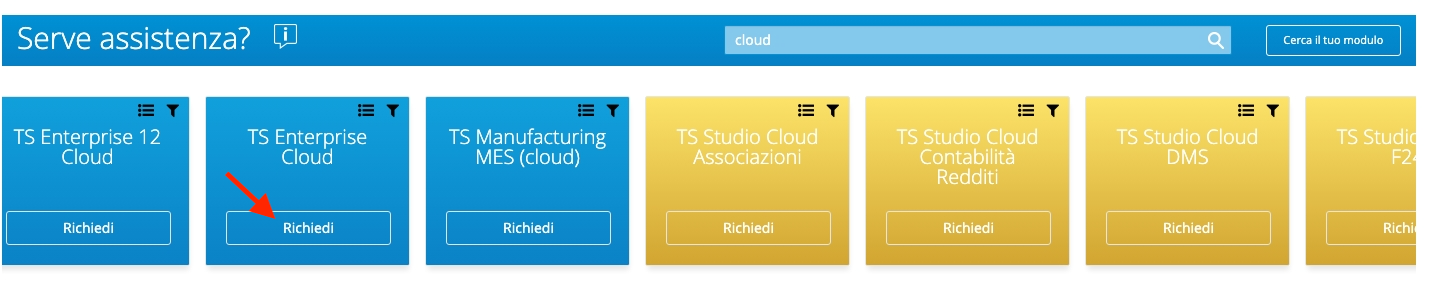
È necessario aprire un ticket su MySupport nella coda dedicata:
- Linea di prodotto: TS Enterprise Cloud
- Procedura: TS Enterprise Cloud
- Area: WebAPI e Personalizzazioni
- Modulo: Supporto sviluppo WebAPI
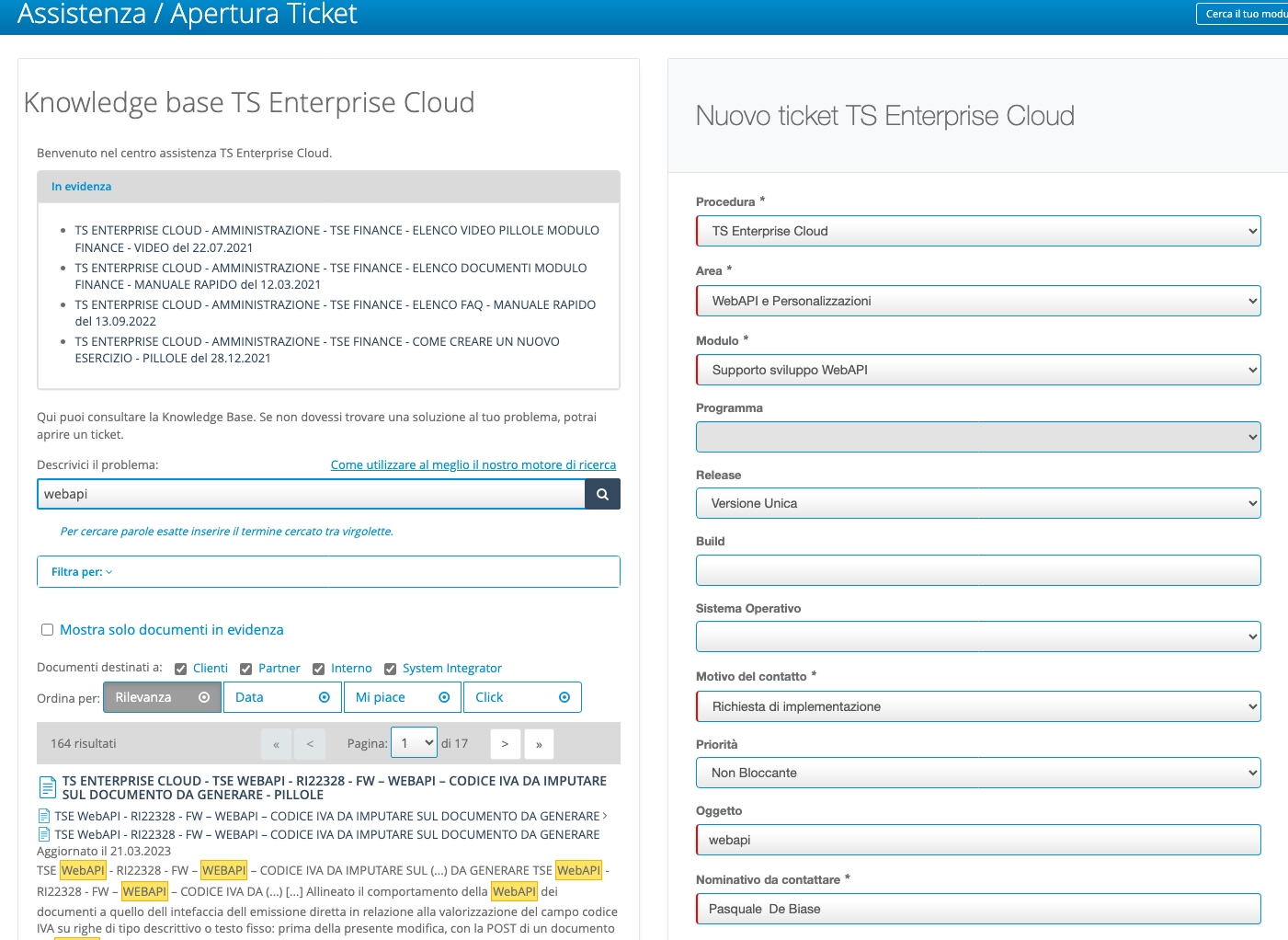
specificando:
- l'URL dell'installazione di Teamsystem Enterprise Cloud che si desidera abilitare
- un indirizzo email della risorsa certificata
Al termine del processo di abilitazione, verrà distribuita una chiave tecnica che consentirà l'accesso ai servizi e verrà specificato il nome dell'ambiente da utilizzare nell'ambito.
Esempio di risposta di supporto dopo il processo di abilitazione:
| Parametro | Valore |
|---|---|
| cid | webapixxxx1 |
| apigwt_base_url | https://apixxxx1.teamsystem.io |
| scope | webapixxxx1_alywebapixxxx1 |
| api_key | eyJhbGciOiJIUzI1NiIsInR5cCI6IkpXVCJ9IsInR5cCI6IkpXVCJ9IsInR5cCI6IkpXVCJ9IsInR5cCI6IkpXVCJ9....... |
| username | admin_webapixxxx1 |
Il codice di licenza che abilita l'uso delle API è 4520.
| MODULO | CODICE | LICENZA | DESCRIZIONE |
|---|---|---|---|
| 4520 | TE-4520 | 4520 | Web API |
| 55166 | S-TE-55166 | 4520 | Web API |
| 84006 | SAAS-TE-84006 | 4520 | Web API |
| 80057 | SAAS-TE-80057 | 4520 | Web API |
N.B.: La differenza tra i vari codici è legata alla presenza di diversi listini per singole procedure e/o diverse installazioni.
TSE utilizza un token JWT per autenticare i servizi applicativi Non criptato firmato con chiave asimmetrica (pubblica/privata) Lo scope consente di controllare l’ambito di applicabilità del token e coincide con l’ambiente applicativo di lavoro su cui si può operare e fa parte del payload. Il token scade ed è valido per 8 ore (exp - expiration time) L’api key è per SI/Impianto Cliente
Utilizzare il token di sessione (chiave API)
Ora puoi iniziare a utilizzare la chiave API per autenticare le tue richieste.
Puoi usare la chiave API nell'intestazione della tua richiesta come Bearer Token:
È importante che nella sezione del token la chiave API sia preceduta dalla parola "Bearer" seguita da uno spazio, ad esempio:
{
  "token": "Bearer AbCdyJhbGciOiJ1NiIsInR5cCI6IkpXVCJ9.eyJzdWIiOiJ3ZWJhcGlhZG1pbiIsIndlYmFwaTphdXRoZW50aWNhdGlvbjpzY29wZSI6Imh1Yl9hZG1pbixjc2RlbW9fYWx5Y3NkZW1vIiwianRpIjoiNTRlOTJlY2MtN2I1OS00YWVjLThiOTMtYWVjYmQwNTk1ZmUzIiwiaWF0IjoxNjk0MDkwMzc5LCJpc3MiOiJBbHlDRVNydjJTcnZJc3N1ZXIiLCJhdWQiOiJBbHlDRVNydjJTcnZBdWRpZW5jZSJ9.QyQdBWnULnM9TF1eCuY7x8JIXxPuOUiyg1_YnxbjaCE"
}
- React
- C#
- cURL
function get_token(props) {
  ///Modifica i seguenti valori ricevuti durante l'attivazione
  const APIGWT_BASE_URL = "https://apicsdemo.teamsystem.io";
  const SCOPE = "csdemo_alycsdemo";
  const APIKEY = "XyJhbGciOiJIUzI1NiIsInR5cCI6IkpXVCJ9.eyJzdWIiOiJ3ZWJhcGlhZG1pbiIsIndlYmFwaTphdXRoZW50aWNhdGlvbjpzY29wZSI6Imh1Yl9hZG1pbixjc2RlbW9fYWx5Y3NkZW1vIiwianRpIjoiNTRlOTJlY2MtN2I1OS00YWVjLThiOTMtYWVjYmQwNTk1ZmUzIiwiaWF0IjoxNjk0MDkwMzc5LCJpc3MiOiJBbHlDRVNydjJTcnZJc3N1ZXIiLCJhdWQiOiJBbHlDRVNydjJTcnZBdWRpZW5jZSJ9.QyQdBWnULnM9TF1eCuY7x8JIXxPuOUiyg1_YnxbjaCE"
  const USERNAME = "admin_csdemo";

  const GRANT_TYPE = "token";
  const PASSWORD = "";
  const BEARER_TOKEN = "Bearer " + APIKEY;
  const ALLOW_ORIGIN = "http://localhost:3000";
  const CONTENT_TYPE = "application/x-www-form-urlencoded";
  const WEBURL = APIGWT_BASE_URL + "/api/v1/auth/token";
  const [token, setToken] = useState(null);
  const [result, setResult] = useState('');
  const [error, setError] = useState('');

  const myHeaders = new Headers();
  myHeaders.append("Content-Type", CONTENT_TYPE);
  myHeaders.append("Access-Control-Allow-Origin", ALLOW_ORIGIN);

  const urlencoded = new URLSearchParams();
  urlencoded.append("username", USERNAME);
  urlencoded.append("grant_type", GRANT_TYPE);
  urlencoded.append("scope", SCOPE);
  urlencoded.append("token", BEARER_TOKEN);
  urlencoded.append("password", PASSWORD);

  const requestOptions = {
    method: "POST",
    headers: myHeaders,
    body: urlencoded,
    redirect: "follow"
  };

  const authenticate = async () => {
    fetch(WEBURL, requestOptions)
      .then((response) => response.text())
      .then(result => setResult(result))
      .catch(error => setError(error.toString()));
  };

  const handleAuthResponse = () => {
    const hash = window.location.hash;
    if (hash) {
      const params = new URLSearchParams(hash.substring(1));
      const accessToken = params.get('access_token');
      if (accessToken) {
        setToken(accessToken);
      }
    }
  };

  useEffect(() => {
    handleAuthResponse();
  }, []);

  return (
    <div>
      <button onClick={authenticate}>Ottieni Token</button>
      <div>
        <code className="language-json" style={{ whiteSpace: 'pre-wrap' }}>

          {(() => {
            try {
              return JSON.stringify(JSON.parse(result), null, 2);
            } catch (e) {
              return result;
            }
          })()}
        </code>
      </div>
      <div>
        <pre>
          {(() => {
            try {
              return JSON.stringify(JSON.parse(error), null, 2);
            } catch (e) {
              return error;
            }
          })()}
        </pre>
      </div>
    </div>
  );
}
  using System.Collections.Generic;
  // Non è più necessario il boilerplate con le dichiarazioni di livello superiore (https://docs.microsoft.com/en-us/dotnet/core/tutorials/top-level-templates)
  var client = new HttpClient();
  var request = new HttpRequestMessage(HttpMethod.Post, "https://apicsdemo.teamsystem.io/api/v1/auth/token");
  request.Headers.Add("Access-Control-Allow-Origin", "http://localhost:3000");
  var collection = new List<KeyValuePair<string, string>>();
  collection.Add(new("username", "admin_csdemo"));
  collection.Add(new("grant_type", "token"));
  collection.Add(new("scope", "csdemo_alycsdemo"));
  collection.Add(new("token", "Bearer XyJhbGciOiJIUzI1NiIsInR5cCI6IkpXVCJ9.eyJzdWIiOiJ3ZWJhcGlhZG1pbiIsIndlYmFwaTphdXRoZW50aWNhdGlvbjpzY29wZSI6Imh1Yl9hZG1pbixjc2RlbW9fYWx5Y3NkZW1vIiwianRpIjoiNTRlOTJlY2MtN2I1OS00YWVjLThiOTMtYWVjYmQwNTk1ZmUzIiwiaWF0IjoxNjk0MDkwMzc5LCJpc3MiOiJBbHlDRVNydjJTcnZJc3N1ZXIiLCJhdWQiOiJBbHlDRVNydjJTcnZBdWRpZW5jZSJ9.QyQdBWnULnM9TF1eCuY7x8JIXxPuOUiyg1_YnxbjaCE"));
  collection.Add(new("password", ""));
  var content = new FormUrlEncodedContent(collection);
  request.Content = content;
  var response = await client.SendAsync(request);
  response.EnsureSuccessStatusCode();
  Console.WriteLine(await response.Content.ReadAsStringAsync());
  curl -X POST "https://apicsdemo.teamsystem.io/api/v1/auth/token" \
  -H "Content-Type: application/x-www-form-urlencoded" \
  -H "Access-Control-Allow-Origin: http://localhost:3000" \
  -d "username=admin_csdemo" \
  -d "grant_type=token" \
  -d "scope=csdemo_alycsdemo" \
  -d "token=Bearer XyJhbGciOiJIUzI1NiIsInR5cCI6IkpXVCJ9.eyJzdWIiOiJ3ZWJhcGlhZG1pbiIsIndlYmFwaTphdXRoZW50aWNhdGlvbjpzY29wZSI6Imh1Yl9hZG1pbixjc2RlbW9fYWx5Y3NkZW1vIiwianRpIjoiNTRlOTJlY2MtN2I1OS00YWVjLThiOTMtYWVjYmQwNTk1ZmUzIiwiaWF0IjoxNjk0MDkwMzc5LCJpc3MiOiJBbHlDRVNydjJTcnZJc3N1ZXIiLCJhdWQiOiJBbHlDRVNydjJTcnZBdWRpZW5jZSJ9.QyQdBWnULnM9TF1eCuY7x8JIXxPuOUiyg1_YnxbjaCE" \
  -d "password="