How to
Obtain personal token
How to enable your system to use the APIs
A prerequisite for the process is that the VAT number associated with the system has the license that enables the use of the APIs.
Enabling the environment is allowed ONLY for Certified System Integrators. For details on the certification path click here
You need to open a ticket on MySupport in the dedicated queue:
- Product Line: TS Enterprise Cloud
- Procedure: TSEnterprise Cloud
- Area: WebAPI and Customizations
- Module: WebAPI Development Support
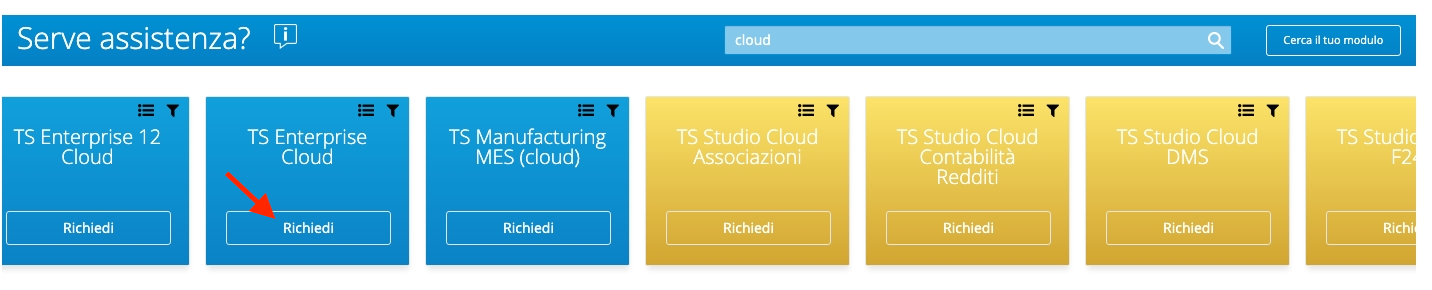
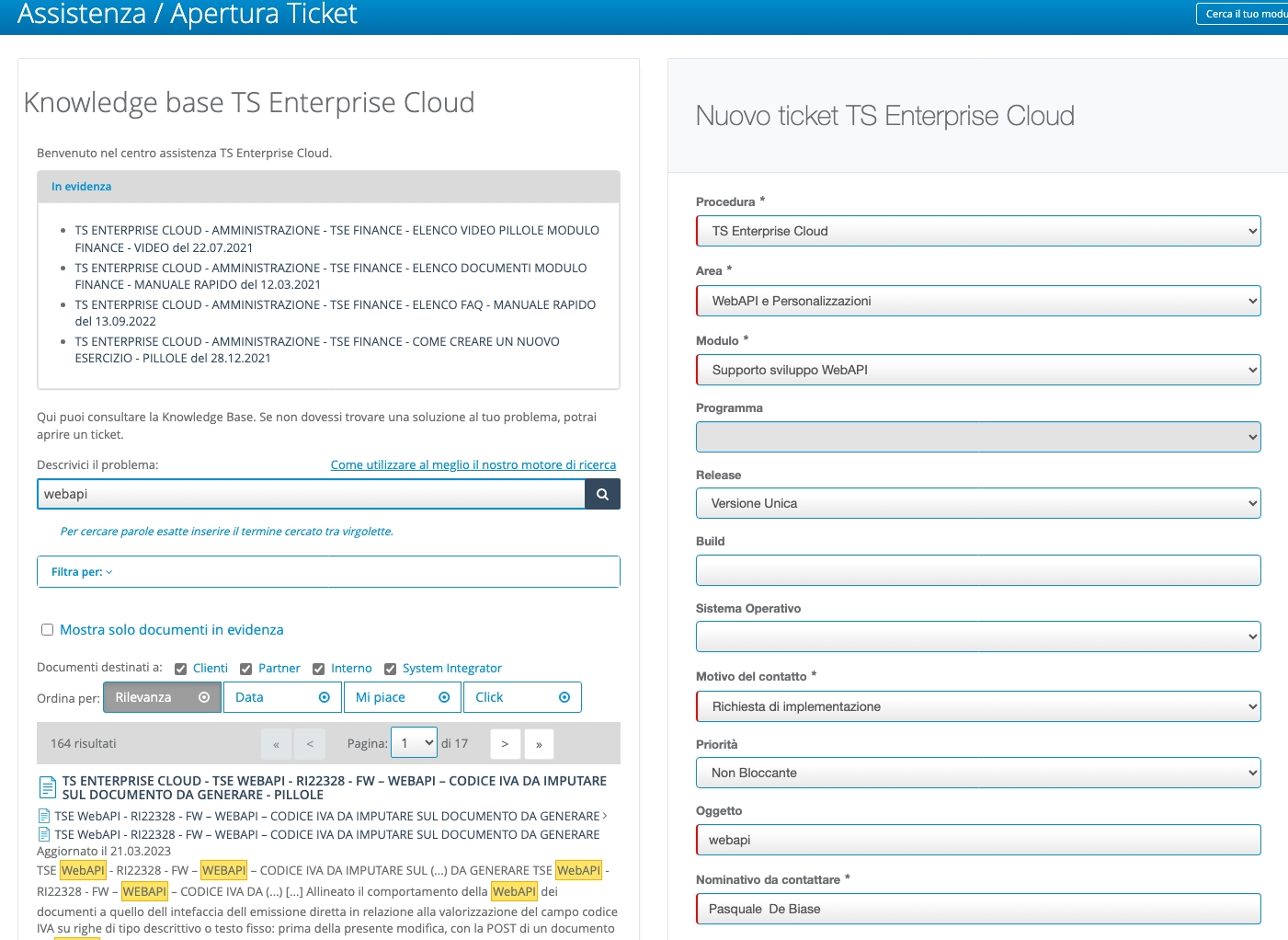
specifying:
- the URL of the Teamsystem Enterprise Cloud installation you want to enable
- an email address of the certified resource
At the end of the enabling process, a technical key will be distributed that will allow access to the services and the name of the environment to be used in the scope will be specified.
Sample support response after enabling process:
| Parameter | Value |
|---|---|
| cid | webapixxxx1 |
| apigwt_base_url | https://apixxxx1.teamsystem.io |
| scope | webapixxxx1_alywebapixxxx1 |
| api_key | eyJhbGciOiJIUzI1NiIsInR5cCI6IkpXVCJ9IsInR5cCI6IkpXVCJ9IsInR5cCI6IkpXVCJ9IsInR5cCI6IkpXVCJ9....... |
| username | admin_webapixxxx1 |
The license code that enables the use of the APIs is 4520.
| MODULE | CODE | LICENSE | DESCRIPTION |
|---|---|---|---|
| 4520 | TE-4520 | 4520 | Web API |
| 55166 | S-TE-55166 | 4520 | Web API |
| 84006 | SAAS-TE-84006 | 4520 | Web API |
| 80057 | SAAS-TE-80057 | 4520 | Web API |
N.B.: The difference between the various codes is related to the presence of different price lists for individual procedures and/or different installations.
TSE uses a JWT token to authenticate application services Not encrypted signed with an asymmetric key (public/private) The scope allows controlling the applicability of the token and coincides with the working application environment on which you can operate and is part of the payload. The token expires and is valid for 8 hours (exp - expiration time) The API key is for SI/Customer System
Use personal token (api key)
Now you start to use api key to authenticate your requests.
You can use the api key in the header of your request as a Bearer Token.:
It is important that in the token section the API Key is preceded by the word "Bearer" followed by a space, for example:
{
  "token": "Bearer AbCdyJhbGciOiJ1NiIsInR5cCI6IkpXVCJ9.eyJzdWIiOiJ3ZWJhcGlhZG1pbiIsIndlYmFwaTphdXRoZW50aWNhdGlvbjpzY29wZSI6Imh1Yl9hZG1pbixjc2RlbW9fYWx5Y3NkZW1vIiwianRpIjoiNTRlOTJlY2MtN2I1OS00YWVjLThiOTMtYWVjYmQwNTk1ZmUzIiwiaWF0IjoxNjk0MDkwMzc5LCJpc3MiOiJBbHlDRVNydjJTcnZJc3N1ZXIiLCJhdWQiOiJBbHlDRVNydjJTcnZBdWRpZW5jZSJ9.QyQdBWnULnM9TF1eCuY7x8JIXxPuOUiyg1_YnxbjaCE"
}
- React
- C#
- cURL
function get_token(props) { ///Modify the following values received during activation const APIGWT_BASE_URL = "https://tsec-swa-tse10-sandbox.thankfulbeach-26fb04e7.westeurope.azurecontainerapps.io"; const SCOPE = "csdemo_alycsdemo"; const APIKEY = "XyJhbGciOiJIUzI1NiIsInR5cCI6IkpXVCJ9.eyJzdWIiOiJ3ZWJhcGlhZG1pbiIsIndlYmFwaTphdXRoZW50aWNhdGlvbjpzY29wZSI6Imh1Yl9hZG1pbixjc2RlbW9fYWx5Y3NkZW1vIiwianRpIjoiNTRlOTJlY2MtN2I1OS00YWVjLThiOTMtYWVjYmQwNTk1ZmUzIiwiaWF0IjoxNjk0MDkwMzc5LCJpc3MiOiJBbHlDRVNydjJTcnZJc3N1ZXIiLCJhdWQiOiJBbHlDRVNydjJTcnZBdWRpZW5jZSJ9.QyQdBWnULnM9TF1eCuY7x8JIXxPuOUiyg1_YnxbjaCE" const USERNAME = "admin_csdemo"; const GRANT_TYPE = "token"; const PASSWORD = ""; const BEARER_TOKEN = "Bearer " + APIKEY; const ALLOW_ORIGIN = "http://localhost:3000"; const CONTENT_TYPE = "application/x-www-form-urlencoded"; const WEBURL = APIGWT_BASE_URL + "/api/v1/auth/token"; const [token, setToken] = useState(null); const [result, setResult] = useState(''); const [error, setError] = useState(''); const [status, setStatus] = useState(null); const myHeaders = new Headers(); myHeaders.append("Content-Type", CONTENT_TYPE); myHeaders.append("Access-Control-Allow-Origin", ALLOW_ORIGIN); const urlencoded = new URLSearchParams(); urlencoded.append("username", USERNAME); urlencoded.append("grant_type", GRANT_TYPE); urlencoded.append("scope", SCOPE); urlencoded.append("token", BEARER_TOKEN); urlencoded.append("password", PASSWORD); const requestOptions = { method: "POST", headers: myHeaders, body: urlencoded, redirect: "follow" }; const authenticate = async () => { fetch(WEBURL, requestOptions) .then((response) => { setStatus(response.status); return response.text(); }) .then(result => setResult(result)) .catch(error => setError(error.toString())); }; const handleAuthResponse = () => { const hash = window.location.hash; if (hash) { const params = new URLSearchParams(hash.substring(1)); const accessToken = params.get('access_token'); if (accessToken) { setToken(accessToken); } } }; useEffect(() => { handleAuthResponse(); }, []); return ( <div> <button onClick={authenticate}>Get Token</button> <div> <code className="language-json" style={{ whiteSpace: 'pre-wrap' }}> {(() => { try { return JSON.stringify(JSON.parse(result), null, 2); } catch (e) { return result; } })()} </code> </div> <div> <pre> {(() => { try { return JSON.stringify(JSON.parse(error), null, 2); } catch (e) { return error; } })()} </pre> </div> <div> <pre>HTTP Status: {status}</pre> </div> </div> ); }
using System.Collections.Generic;
// No more boilerplate needed with top level statements (https://docs.microsoft.com/en-us/dotnet/core/tutorials/top-level-templates)
var client = new HttpClient();
var request = new HttpRequestMessage(HttpMethod.Post, "https://apicsdemo.teamsystem.io/api/v1/auth/token");
request.Headers.Add("Access-Control-Allow-Origin", "http://localhost:3000");
var collection = new List&lt;KeyValuePair<string, string&gt;>();
collection.Add(new("username", "admin_csdemo"));
collection.Add(new("grant_type", "token"));
collection.Add(new("scope", "csdemo_alycsdemo"));
collection.Add(new("token", "Bearer XyJhbGciOiJIUzI1NiIsInR5cCI6IkpXVCJ9.eyJzdWIiOiJ3ZWJhcGlhZG1pbiIsIndlYmFwaTphdXRoZW50aWNhdGlvbjpzY29wZSI6Imh1Yl9hZG1pbixjc2RlbW9fYWx5Y3NkZW1vIiwianRpIjoiNTRlOTJlY2MtN2I1OS00YWVjLThiOTMtYWVjYmQwNTk1ZmUzIiwiaWF0IjoxNjk0MDkwMzc5LCJpc3MiOiJBbHlDRVNydjJTcnZJc3N1ZXIiLCJhdWQiOiJBbHlDRVNydjJTcnZBdWRpZW5jZSJ9.QyQdBWnULnM9TF1eCuY7x8JIXxPuOUiyg1_YnxbjaCE"));
collection.Add(new("password", ""));
var content = new FormUrlEncodedContent(collection);
request.Content = content;
var response = await client.SendAsync(request);
response.EnsureSuccessStatusCode();
Console.WriteLine(await response.Content.ReadAsStringAsync());
  curl -X POST "https://apicsdemo.teamsystem.io/api/v1/auth/token" \
  -H "Content-Type: application/x-www-form-urlencoded" \
  -H "Access-Control-Allow-Origin: http://localhost:3000" \
  -d "username=admin_csdemo" \
  -d "grant_type=token" \
  -d "scope=csdemo_alycsdemo" \
  -d "token=Bearer XyJhbGciOiJIUzI1NiIsInR5cCI6IkpXVCJ9.eyJzdWIiOiJ3ZWJhcGlhZG1pbiIsIndlYmFwaTphdXRoZW50aWNhdGlvbjpzY29wZSI6Imh1Yl9hZG1pbixjc2RlbW9fYWx5Y3NkZW1vIiwianRpIjoiNTRlOTJlY2MtN2I1OS00YWVjLThiOTMtYWVjYmQwNTk1ZmUzIiwiaWF0IjoxNjk0MDkwMzc5LCJpc3MiOiJBbHlDRVNydjJTcnZJc3N1ZXIiLCJhdWQiOiJBbHlDRVNydjJTcnZBdWRpZW5jZSJ9.QyQdBWnULnM9TF1eCuY7x8JIXxPuOUiyg1_YnxbjaCE" \
  -d "password="